Surgical control over every DICOM tag.
A free DICOM editor, anonymizer and 3D viewer for your browser, Mac and Windows PC. Edit metadata, de-identify studies with HIPAA PS3.15 profiles and inspect volumes in MPR. No account needed, and studies are processed on your own machine.
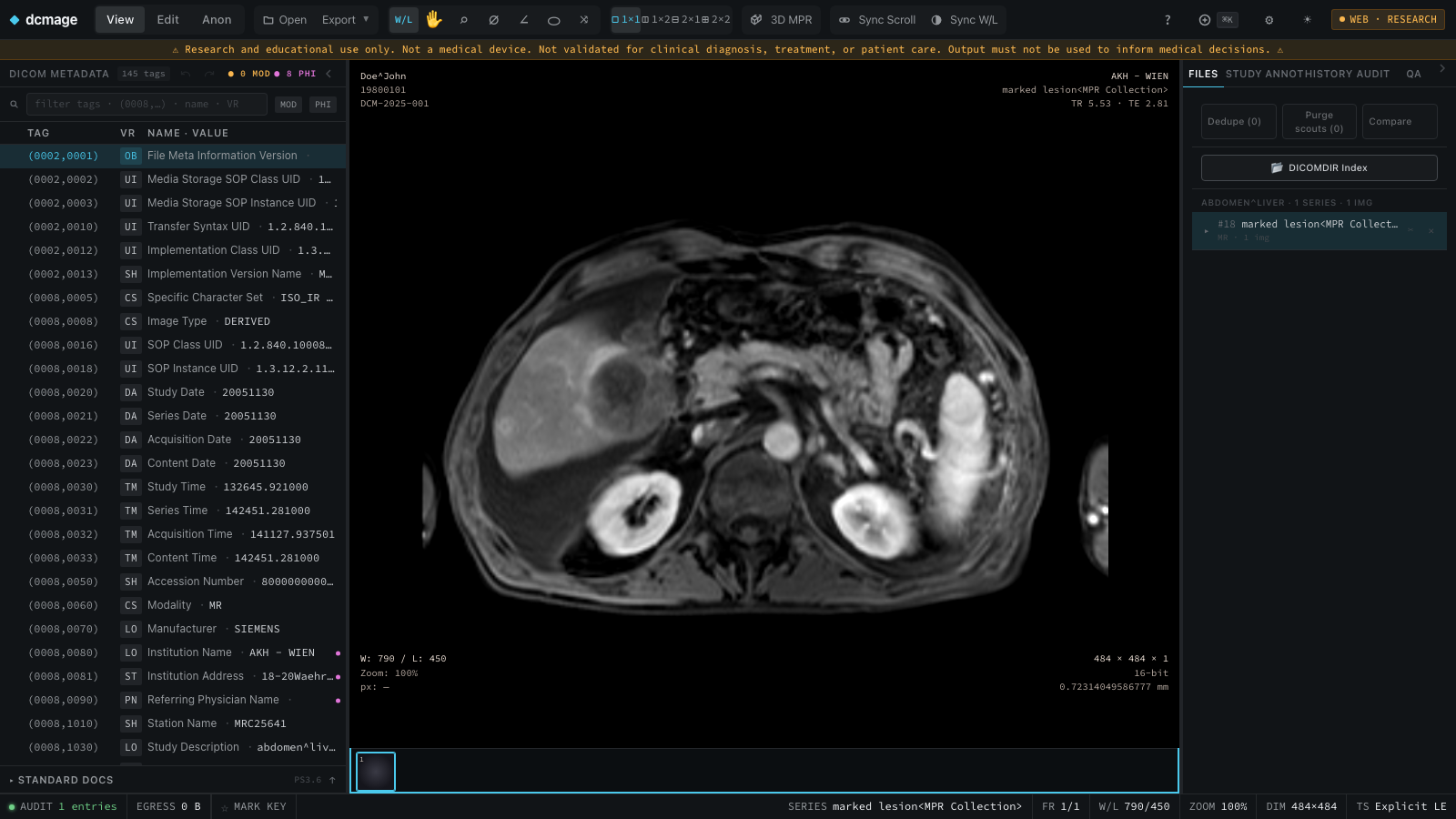
Everything you need to read, repair, and release imaging data.
Four core surfaces — the tag tree, the anonymizer, the viewer, and the audit trail — built for trial curation, metadata repair, and research workloads.
Find and edit any tag, including nested sequences.
The tag tree opens the whole file at once, nested sequences included. Filter by group, element, VR, or value — then edit any tag and see exactly what changed.
- Fast scrolling — stays responsive on files with 10,000 tags.
- Structured search — query (0010,*), a keyword, or any value substring.
- Targeted edits — retype, remap, or clear individual tags with live diff.
- Inline validation — VR conformance and type checks as you type.

Apply PS3.15 profiles and see each rule before export.
Apply de-identification profiles aligned with DICOM PS3.15 with the exact option set your protocol requires. UIDs remap consistently across an entire cohort, and pixel-burned PHI and identifiable faces are removed.
- Built-in profiles — Basic (the full PS3.15 Basic Profile), +Pixel, HIPAA Safe Harbor, Teaching, and fully custom rules.
- Consistent UID remapping — one patient stays one patient across every study.
- Face defacing — propose redaction boxes over the face, ears, jaw and back of the skull on a head MR/CT slice, for you to review.
- Private tag handling — keep, remove, or whitelist vendor blocks.

Three synchronized planes through the volume.
View a series slice by slice, in axial, sagittal and coronal planes with synchronized crosshairs, or as a 3D volume rendering. Move one crosshair and every plane follows. Window/level, zoom and measure in the same view.
- Synchronized crosshairs — one click locates the same voxel in every plane.
- Slab projection — MIP, MinIP or average across a slab thickness set in millimetres.
- Oblique MPR — drag the crosshair to rotate the planes, and reset them to orthogonal in one step.
- 3D volume rendering — a GPU ray-cast of the loaded volume that you rotate with the mouse.
- Cine playback — play ultrasound or angiography loops at the stored frame rate, from 0.25× to 4×.
- RT dose overlay — an RT Dose as a colour wash in Gy over its planning CT or MR, with isodose lines.
- Window/level — right-drag to adjust W/L; left-drag to pan; scroll to zoom.
- Measurement tools — distance, angle, ROI statistics, pixel probe, labelled arrows and Cobb angle.

A complete record of every change.
Every edit, anonymization, and export is logged and chained with SHA-256 session hashes — a complete, ordered record of what was done to a dataset that you can export for IRB and compliance review.
- Hash-chained log — SHA-256 hash chain over the session log.
- Full provenance — original → derived lineage for every file.
- Exportable — CSV / JSON trails for IRB and audit.
- Non-destructive — originals are never modified in place.

Pixel operations
Crop, resample, reorient, and rescale into derived copies — the original series stays as it is.
Format conversion
DICOM → NIfTI, PNG/TIFF frames, MP4/GIF clips, lossless JPEG 2000, HTJ2K or JPEG-LS recompression, and clean de-identified DICOM resends.
Conformance validation
Check datasets against IOD requirements and report which tags fail.
CLI & automation Planned · Pro
Desktop-only scriptable CLI for repeatable DICOM operations.
Batch & cohorts Planned · Pro
Run any workflow across thousands of studies with live progress and full rollback.
Local-first by design
Core DICOM work stays on your device in the web app and desktop app. Data is sent only when you choose to submit feedback.
Built for specific tasks, not a blank canvas.
Designed for real-world imaging engineering tasks — each workflow below maps directly to features the app handles today. A sample across twelve categories:
- Multi-center trial PHI removal
- Safe Harbor 18-identifier scrub
- Vendor private tag cleanup
- Reversible key-vault mapping
- Face region boxes for head MR/CT
- Retain longitudinal temporal info
- Correct patient name
- Fix DOB and sex
- Correct StudyDescription and codes
- Rename and reorder series
- UID regeneration for derived copies
- Set Institution and operator tags
- Split fused series by orientation
- Merge studies and series
- Purge scouts, duplicates, corrupt instances
- Crop to anatomical ROI
- Resample to isotropic 1 mm
- Reorient axial / sagittal / coronal
- Window / level baking
- Lossless JPEG 2000 / HTJ2K recompression
- Annotation burn-in and MPR export
- DICOM → NIfTI
- PNG / TIFF frames and MP4 / GIF clips
- DICOMDIR generation
- IOD conformance per modality
- Missing required tags report
- Diff two studies or files
- Structured Report editing
- RTSTRUCT contour editing
- RT dose colour wash and isodose lines
- ECG waveform visualization
- Whole-slide imaging inspection
- Encapsulated PDF / STL extraction
- SHA-256 hash-chained audit trail
- Tamper-detection re-verification
- IRB-ready litigation export
Start free. Buy Pro once.
Everything dcmage does today is free, on web and desktop — the tag editor, the full PS3.15 anonymizer, the 3D viewer, and signed integrity manifests. Pro adds scale and portable provenance: whole folders, a command line, and a record you can hand to a sponsor. One-time price. No subscription.
- Web app and native apps for macOS and Windows
- Virtualized tag tree — search, edit, VR validation
- Full PS3.15 profiles + consistent UID remapping
- 3D MPR viewer, pixel ops, face region boxes
- Signed integrity manifests + hash-chained audit
- Folder & cohort batch processing
- Command line and scripted runs
- PACS and DICOMweb connectivity
- Everything in Free
- Folder & cohort batch anonymization
- Command line for scripted and repeatable runs
- Cohort-level signed manifests
- Audit report export for sponsors and IRBs
- PACS query/retrieve/store (DIMSE)
- DICOMweb — QIDO-RS, WADO-RS, STOW-RS
- Modality Worklist (MWL) and MPPS
- FHIR demographic reconciliation
Your PHI never has to touch the cloud.
Process DICOM studies entirely on-device — no data transfer in the web app or on desktop. Open the browser version in seconds.